

In mobile app and digital product work, one architectural consideration comes up again and again: should we build with Flutter, React Native, or native iOS/Android?
In the increasingly uncommon case where a product is only targeting either iOS or Android, we usually recommend building on native frameworks. However, very often we work with clients to develop cross-platform products where framework selection is more complex.
Cross-platform development toolkits have matured considerably in the last few years, but the decision is still nuanced. The biggest trade-offs are not purely technical, but instead involve factors such as staffing realities, product design and differentiation, and how deep the platform integrations go.
Often, client product teams arrive leaning toward a particular framework. We help validate that instinct by digging into the product roadmap, platform requirements, and the organization’s long-term engineering model while clarifying how the capabilities and tradeoffs of these platforms have evolved in recent years.
We’ve seen cross-platform frameworks unlock real leverage when teams need to ship fast across iOS and Android, but it’s not always a cost-cutting shortcut. The decision of which toolkit to adopt reshapes staffing, governance, and long-term maintenance. Done well, these changes can yield faster releases, fewer parallel roadmaps, and a lower long-term operating burden.
Understanding the contenders
Today’s mobile teams have more architectural options than ever. Cross-platform frameworks promise shared codebases across iOS and Android, while native development continues to offer the deepest integration with each platform.
The ecosystem includes a range of approaches. Frameworks like Ionic or Capacitor extend web applications into mobile environments. .NET MAUI (formerly Xamarin) brings Microsoft’s ecosystem into cross-platform development. Kotlin Multiplatform allows teams to share business logic while keeping fully native interfaces.
In practice, however, most organizations evaluating modern mobile architecture end up comparing three primary paths: Flutter, React Native, and fully native iOS and Android development.
Flutter provides its own UI framework and rendering engine. Teams build interfaces in Dart, and Flutter draws the interface itself rather than relying on each platform’s native UI components. The result is a high degree of visual consistency: one set of UI primitives, one layout model, and a unified approach to animation across iOS and Android.
React Native takes a different approach. Teams build interfaces with React components (using JavaScript or TypeScript), which are translated into native UI components on each platform. In practice, React Native aims to preserve a native feel by leaning on platform UI elements and APIs while still sharing a large portion of application logic.
Native iOS and Android development skips the abstraction layer entirely and builds directly on each platform’s frameworks and APIs (SwiftUI/UIKit on iOS; Jetpack Compose on Android). This remains the most direct path to new OS features and to the conventions that make each platform feel like itself.
These architectural differences shape everything that follows: how consistent the interface can be across platforms, how easily teams access platform-specific features, and how much code can realistically be shared between iOS and Android.
Flutter: Consistency, Control, and Design-Driven Experiences
Flutter is our most common recommendation when a distinctive and compelling UI is a primary differentiator: custom motion, custom transitions, and a unified visual system that needs to stay consistent across iOS and Android over time. That consistency is built into Flutter’s technical architecture: one rendering pipeline and one set of UI building blocks that Flutter controls directly rather than relying on each platform’s native UI components.
For early-stage teams with clear cross-platform needs, that can translate into faster iteration and fewer parallel implementation decisions, since the UI system is built once and shipped consistently across both platforms.
Flutter’s performance reputation still comes up in some architecture conversations. Early versions of the framework faced criticism around scrolling performance and animation smoothness, and those impressions still linger in parts of the industry. In practice, modern Flutter applications can be extremely performant when built well, and many of the early limitations have long since been addressed.
These strengths are particularly valuable in products where the interface is part of the storytelling or experience.
That was a key reason we built the Meow Wolf app in Flutter. The product called for an interface that masquerades as its own operating system, complete with custom status bar symbols and “applets” that behave like little experiences inside a fictional OS. Flutter let us build that bespoke UI once, then ship it consistently on iOS and Android without “skinning” two separate native toolkits.



The app also had to bridge physical and digital experiences. We used BLE beacon interactions and geofences to detect when someone left an exhibit and then unlock post-visit story and behind-the-scenes content. Where Flutter needed deeper platform hooks, we built native functionality and connected it back through Flutter Channels, including a custom geofence management tool when third-party libraries didn’t meet background-processing requirements.
Another mobile app we chose to build with Flutter is Fennel, a cross-platform investing app we brought to life from the ground up.
The product differentiates itself with values-led decision-making within the user flow, including an ESG (Environmental, Social, and Governance) Wheel that surfaces 200+ ESG data points and shareholder voting that lets investors access and cast votes directly from the app. Flutter gave us a consistent, design-forward UI across iOS and Android while we iterated quickly on a new brand system and feature set.
One consideration organizations should keep in mind is the ecosystem around Dart, Flutter’s programming language. While the language is approachable, it is far less common than JavaScript or TypeScript in most organizations. Teams adopting Flutter often rely more heavily on dedicated Flutter expertise rather than extending an existing internal talent pool.
React Native: Aligning Mobile with the React Ecosystem
React Native often makes the most sense when mobile development needs to align closely with an existing React ecosystem. This is especially common in larger organizations and enterprises where mature web teams, shared design systems, and established engineering workflows already revolve around React and TypeScript, often with existing accessibility standards, analytics patterns, and tooling already in place. React Native can extend that ecosystem to mobile while still building native interfaces.
It’s also worth emphasizing that React Native apps are not simply web applications wrapped in a mobile shell. The framework primarily renders native UI components, even though teams can embed web content where appropriate.
One concrete example is our work with Goosehead Insurance. We chose React Native to align with Goosehead’s existing React-based web platform and deliver a single cross-platform codebase that could scale alongside their enterprise systems and internal expertise. Goosehead’s backend systems centered on Salesforce, so we also built a dedicated API layer (using NestJS) to orchestrate data flow and business logic between the mobile app and Salesforce, while keeping the experience fast and reliable. That architecture supported a customer experience where clients can pull up policy details in seconds instead of waiting on hold.

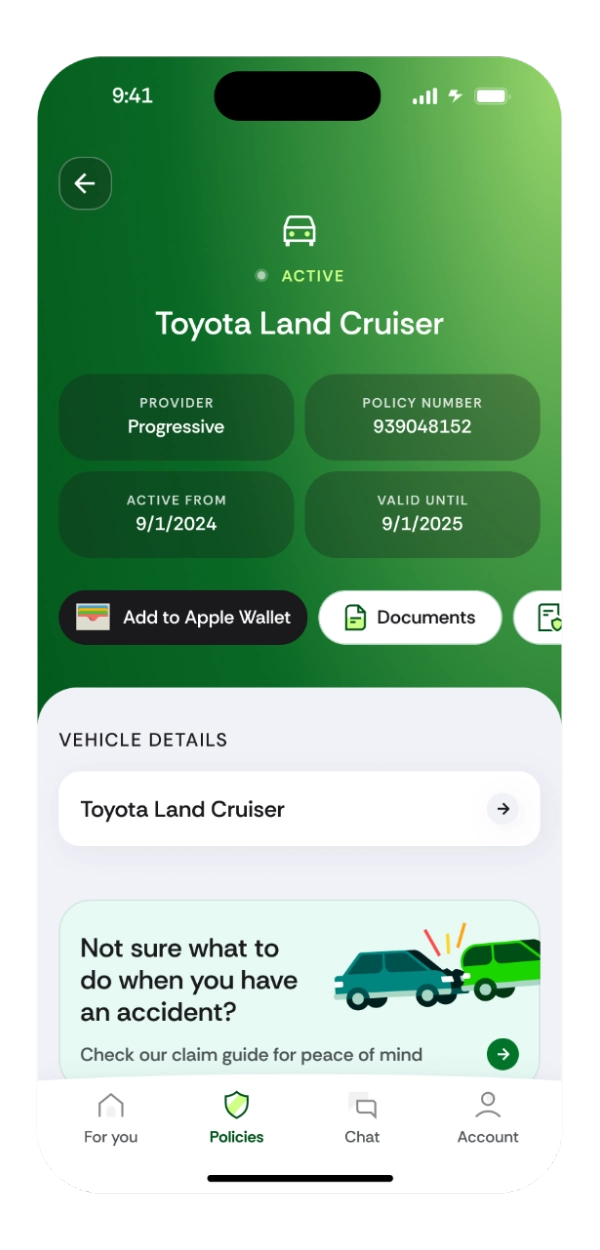
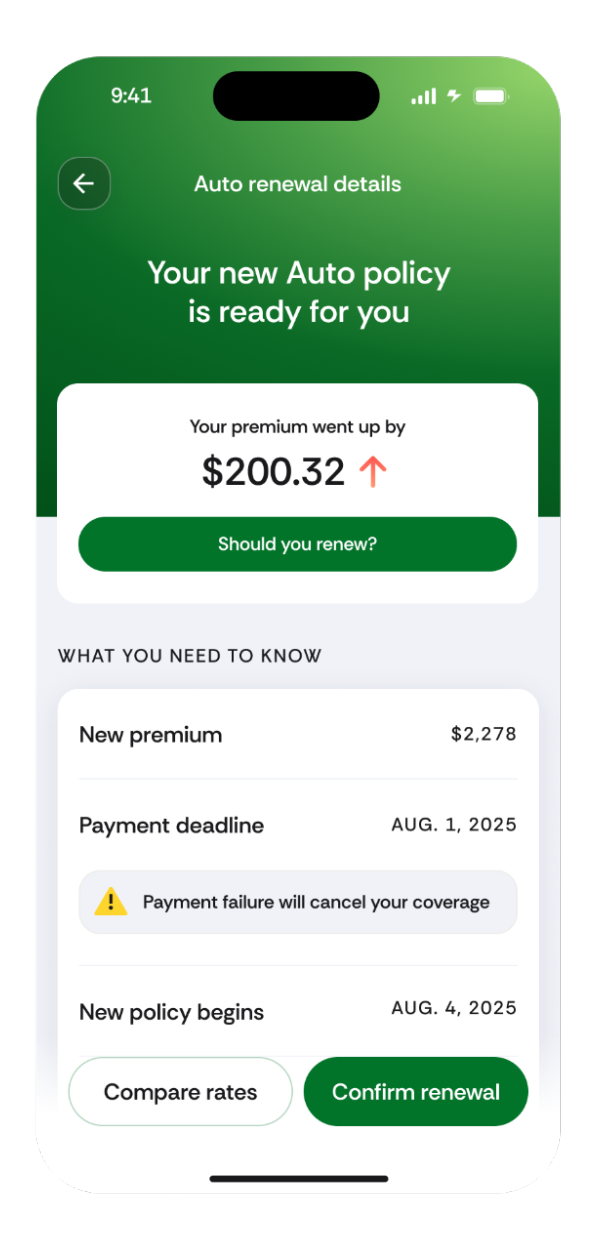
When the product required truly platform-specific behavior like adding digital insurance cards to Apple Wallet, we implemented targeted native modules in Swift (iOS) and Kotlin (Android) while keeping most of the UI and product logic shared. That hybrid approach matched the organization’s staffing realities and existing tooling, without giving up native fit where it mattered.
In terms of trade-offs, React Native can introduce additional operational complexity in comparison to Flutter, including dependency management, native build toolchains, and ongoing ecosystem upgrades. Performance considerations can also arise from React Native’s architecture, which coordinates UI logic in JavaScript with native platform components.
React Native has improved meaningfully in recent years, including changes to how JavaScript and native code interact. The newer architecture is designed to reduce overhead in communication between those layers, which can improve responsiveness in some situations. However, it isn’t a universal performance fix, and results still depend on how frequently the application needs to coordinate work between JavaScript and native components.
Native: When Platform Capability Matters Most
Native is often right when platform capability is a core constraint or advantage. In practice, this usually happens when platform-specific features begin to dominate the product roadmap.
Of course, if the audience is focused primarily on a single OS, an iOS-first or Android-first native release can be the fastest path to traction, even when a second platform might follow later, once the product proves itself. The same logic applies when the hardware is fixed: an iPad-only field tool, an Android tablet kiosk, or a dedicated device environment where teams need tight control and minimal abstraction.
In cross-platform products, native often becomes the right choice when the app’s roadmap depends heavily on lower-level OS features: complex Bluetooth workflows, background location and geofencing, real-time camera or audio processing, AR frameworks (ARKit/ARCore), biometrics, Apple Wallet / Google Wallet, health integrations, or home-screen widgets. Cross-platform stacks can support many of these, but they often require more native modules and custom edge-case handling, which increases long-term maintenance risk and complexity, and can also introduce performance overhead in demanding scenarios.
Our work with Warby Parker represents a good example of the native advantage. We built the iOS app to feel unmistakably at home on the platform, leaning into iOS interface conventions and interaction patterns rather than forcing a one-size-fits-all UI. On the commerce side, we integrated Apple Pay to make checkout fast and frictionless, which is exactly the kind of system-level capability that’s simplest to implement and maintain when the app is built directly on the platform.



Native development provides the deepest access to platform capabilities, but it also means maintaining two separate codebases and development workflows. This is an intentional trade-off many teams accept when platform capability becomes central to the product.
Choosing the Right Stack
In practice, choosing between these approaches is rarely about which framework is “best.” Instead, the decision often hinges on three factors.
First, the product experience. If a product depends on a highly customized interface or a unified visual system across platforms, Flutter can be a strong fit. Because Flutter controls its own rendering layer, teams can implement complex motion systems and custom UI once and reproduce them consistently across iOS and Android.
Second, product requirements. When the roadmap depends heavily on platform-specific APIs, hardware integration, or system-level features, native development is often the most reliable path forward, even at the cost of maintaining separate implementations across iOS and Android. It allows teams to take advantage of new OS capabilities immediately and maintain experiences that feel fully aligned with platform conventions.
Third, the organizational ecosystem. Teams with established React expertise, shared design systems, and mature web infrastructure may find React Native provides the most development velocity and is a natural extension of how they already work. It empowers web and mobile teams to share patterns, tooling, and development practices while still delivering native-like mobile apps.
In practice, the challenge is balancing these factors against each other. A thoughtful architecture decision is not about chasing a particular framework. It is about choosing the approach that best supports the product, the platform, and the organization behind it.
For teams navigating that decision, we’re always happy to help evaluate the tradeoffs. If your team is weighing different mobile architectures and development approaches and wants a recommendation grounded in roadmap and operating reality, reach out.