
WordPress 6.9 is here, and with it come features that set the stage for the future of content collaboration and AI-assisted workflows inside the world’s most popular CMS.
We’re proud to share that 15 Fueled team members are credited with contributions to the 6.9 release, with 4 recognized as Noteworthy Contributors: myself (VP of Open Source Initiatives), Director of Editorial Engineering Fabian Kaegy, Lead Engineer Peter Wilson, and Senior Engineer Mukesh Panchal. Our 10up WordPress Practice continues to shape the features that matter most to modern content teams and organizations.
A Focus on Collaboration Begins: “Notes”
The most impactful new user-facing feature in WordPress 6.9, especially for teams collaborating on content operations, is Notes: a commenting system for the WordPress editor. Fueled led the project management and contributed to the engineering work on this feature.
Notes brings native, in-context communication to the content editing experience. Editors and stakeholders can now leave comments directly within the editor, enabling asynchronous feedback and approvals without leaving the CMS or relying on disconnected tools.

This solves a long-standing and growing challenge for larger organizations: the disconnect between editorial collaboration and final content production. As content layout becomes more dynamic, and as AI accelerates early drafting, team collaboration in the “last mile,” that crucial polish and review phase, increasingly becomes one of the most essential functions of a modern CMS.
Today, Notes are available only in the editing interface for users with full editing permissions. Our team is already envisioning a future for Notes in the Preview mode, so other stakeholders can leave feedback, aligned with the front-end view, and without the ability to edit or alter the content and layout (even incidentally). It’s a significant enhancement for organizations with rigorous review and compliance processes, and one we expect to see land in a near-future release.
This is just the beginning of a renewed focus on collaborative content creation, with live collaborating editing still on the near term roadmap for WordPress in 2026. I’ve also opened an issue on the official WordPress project repository earmarking specific improvements for Notes targeting the next release, if you’d like to learn more about its roadmap or follow along.
AI Foundations and Plumbing
With the 6.9 cycle, WordPress has made a strategic investment in laying the infrastructure for a future where AI isn’t just a novelty or a capability outside the CMS that must be painstakingly integrated, but a first‑class capability. At its heart is the new Abilities API: a registry through which WordPress declares its core capabilities in a standardized, machine‑readable way.
Another key release from the 6.9 cycle is the WP AI Client, a foundational library that standardizes how WordPress connects to external AI service providers, developed alongside WordPress 6.9. The client simplifies the process of calling large language models from WordPress code — handling requests, responses, and provider configuration — and is proposed for inclusion in WordPress 7.0.
But the biggest leap comes from the official WordPress MCP package, which implements the Model Context Protocol (MCP), an open standard that enables AI agents and external applications to interface directly with a WordPress site. In practice, that means AI tools can call functions like creating posts, managing media, editing content, or moderating comments through a secure, predictable API rather than custom integrations.
The benefit is subtle but powerful: WordPress stops being a CMS that could support AI plugins, and becomes a CMS built for AI. These advancements don’t add visible UI features for editors; they are the plumbing that empowers AI-powered tools to treat a site like a first‑class resource, with permissions, context, and content exposed in a clean, standardized way.
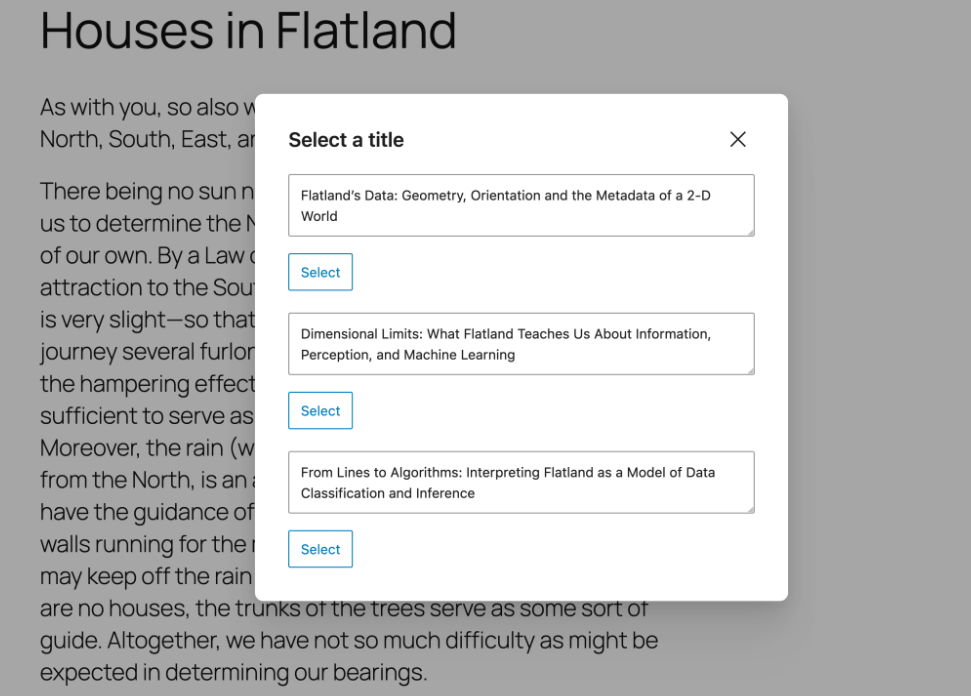
To demonstrate how those building blocks can be used, the new AI Experiments plugin — led end-to-end by Fueled talent — acts as both a reference implementation and an early proof-of-concept. Its first experiment (title generation) is modest, but it illustrates how AI-powered workflows can become embedded within WordPress. The plugin, released alongside WordPress 6.9, serves two audiences: content creators looking for official AI tools, and developers seeking an open-source model for how to extend new under-the-hood capabilities offered by the Abilities API, MCP package, and WP AI Client.
Other Key Additions in WordPress 6.9
Alongside Notes and under-the-hood AI architecture, WordPress 6.9 introduces meaningful improvements for site creators, advanced users, and content teams alike:
- Command Palette across the WordPress Admin: Now available throughout the WordPress dashboard (not just the Site Editor), the Command Palette offers a fast, keyboard-driven way to navigate, search, and execute actions. A win for power users and teams working across large content environments.
- Fit Text to Container: A new design control, aka “stretchy text”, that dynamically resizes heading and paragraph text to fill its container; perfect for responsive layouts and hero sections without needing custom CSS.
- New and Improved Blocks: New core blocks like Accordion, Time-to-Read, Math, and Term Query expand creative flexibility, while enhanced drag-and-drop behavior and block visibility controls improve editorial workflows.
On the performance front, core improvements reduce layout shifts, optimize block CSS loading, and improve how WordPress handles cron jobs and asset delivery. These enhancements contribute directly to better Core Web Vitals, faster load times, and a more seamless experience for both visitors and editorial teams.
Uncommon Expertise in WordPress
We continue to be proud to be part of the team advancing the open source WordPress project. Our inside perspective informs everything we do for our clients, whether it’s delivering a best-in-class CMS experience, integrating with third-party platforms, or developing the tools and workflows that power digital products.Looking to integrate deeper with WordPress, or to build on the leading open source CMS with a team that helps build it? Get in touch.