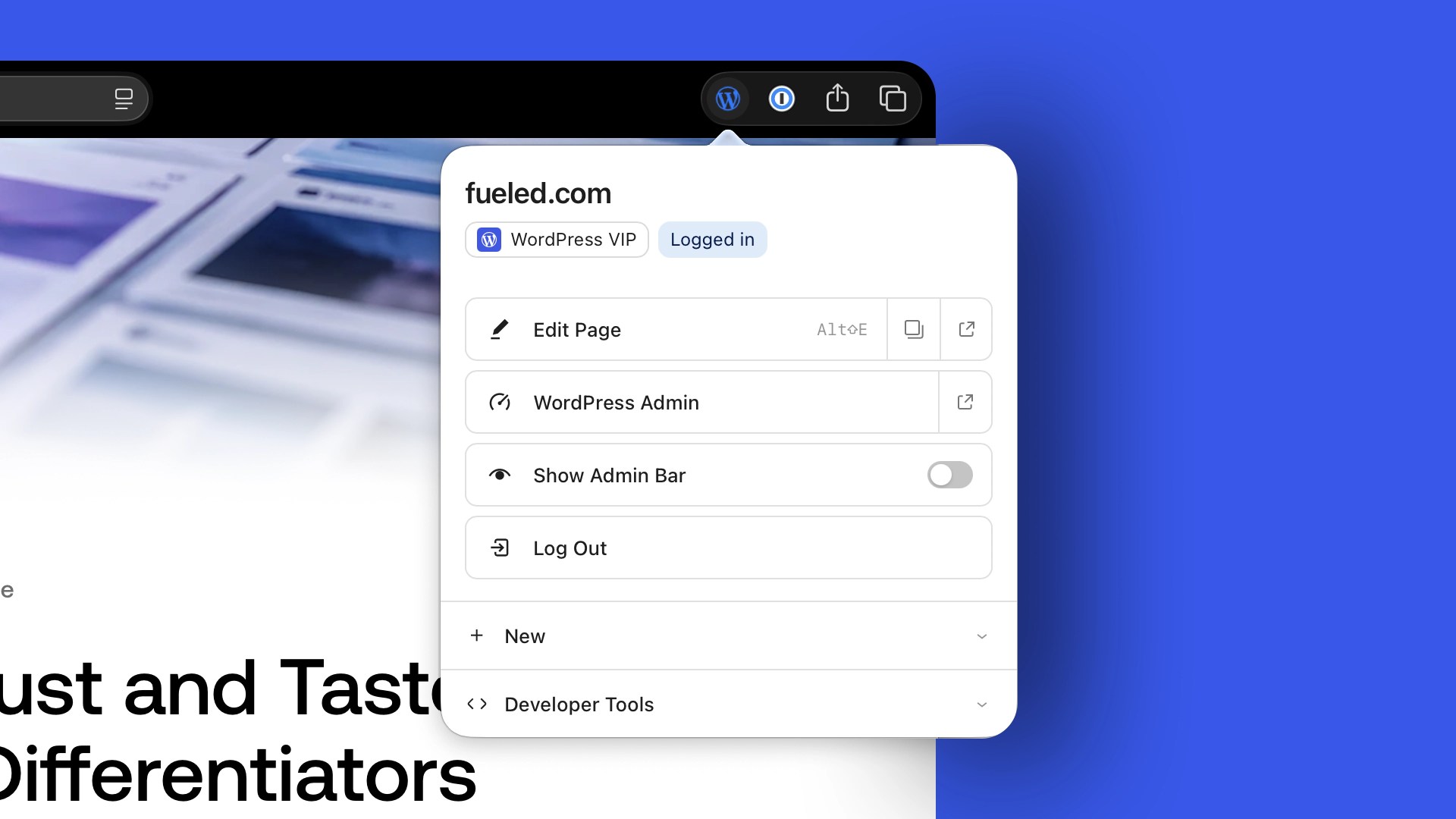

The WordPress admin bar is useful by design. For signed-in users, it keeps editing tools and site-management shortcuts close at hand while they browse the front end. But in some workflows, particularly when reviewing layouts, testing responsive designs, or checking sticky and scroll-driven effects, having those controls inside the viewport can make it harder to see a page exactly as visitors do, especially on sites where plugins have added enough controls to make the bar crowded or visually distracting.
The new official WordPress Browser Extension offers another option. Now available for Google Chrome and Chromium-based browsers and for Safari on macOS, it can hide the admin bar while keeping its most useful shortcuts in the browser toolbar. It also adds a growing set of tools for people who build, publish, test, and manage WordPress sites.
The extension began only a few months ago as a personal side project from Jake Goldman, Founder of 10up and now a Partner and Advisor at Fueled. Jake built the first version to address a small, persistent frustration in his own WordPress workflow. The idea attracted collaborators from Fueled and the wider WordPress community and quickly turned into an official WordPress project.
Its story is also a practical example of how platform expertise, AI-native development, and open source collaboration can shorten the distance between a useful idea and production-ready software. I sat down with Jake to talk about where the extension came from, how it evolved, and where the community might take it next.
Q&A With the Creator of the WordPress Browser Extension
Annie: You’ve been involved in WordPress for many years, from founding 10up to your current role as a Partner and Advisor at Fueled. Can you tell us a little about that journey and why contributing to WordPress continues to be such an important part of your work?
Jake: I’ve believed in open source and open platforms since before I founded 10up. What drew me to WordPress was the idea that a community could work together to build something better than any one company could build alone. That’s been true of the web itself for decades, and WordPress is a great example of those principles in action.
When I started 10up, I wanted contributing back to WordPress to be part of the company’s DNA. That meant contributing to WordPress core, building and maintaining open source plugins, and sharing tools that made the platform better for everyone. Those contributions strengthen the ecosystem and create a larger, healthier marketplace for agencies, hosting companies, product businesses, and the broader community.
That’s something I’ve continued throughout my career, and I’m very proud to see it carrying on to this day at Fueled, as well. Whether it’s contributing to WordPress core, maintaining free and open plugins and tools that people still use today, or working on projects like the browser extension, it’s all driven by the same belief that investing in the platform benefits everyone who builds on it. A rising tide lifts all boats.
Annie: What inspired you to build the official WordPress Browser Extension? What was the problem you kept running into?
Jake: Honestly, it was a very small annoyance that had bothered me for years.
The WordPress admin bar exists for good reasons. It makes it incredibly easy to jump from the front end of a site into editing what you’re looking at, creating new content, or accessing other site management tools. But because it sits inside the browser viewport, it also gets in the way when you’re trying to review a website exactly as visitors see it.
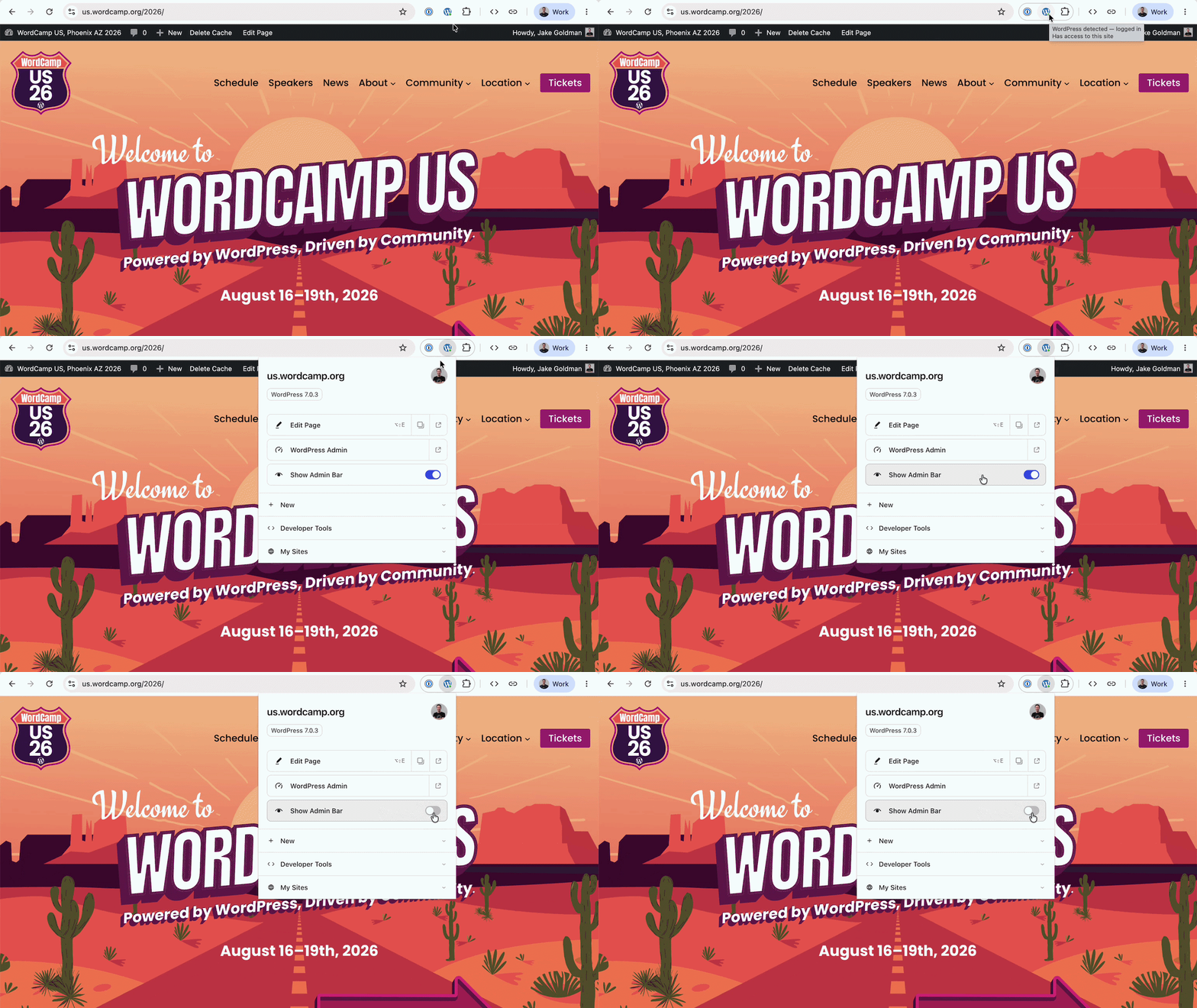
If you’re testing sticky headers, responsive layouts, scroll effects, or anything else tied to the viewport, the admin bar can interfere with what you’re seeing. It can also become cluttered as plugins add more controls. There were already WordPress plugins that offered a hide-and-show control for the admin bar, but because they still operated inside the page, they often introduced quirks of their own. Moving the controls into the browser meant they could sit outside the website experience entirely, without requiring another plugin on every site.
I wanted both. I wanted a clean, unobstructed view of the website while keeping all of those WordPress shortcuts within easy reach. Moving those controls into the browser itself turned out to be a much cleaner solution.
Annie: Hiding the admin bar is the headline feature, but the extension has evolved well beyond that. What else can WordPress users do with it today?
Jake: Once the admin bar moved into the browser, it became obvious that the browser itself was a better home for a lot of these workflows than trying to keep adding them to WordPress.
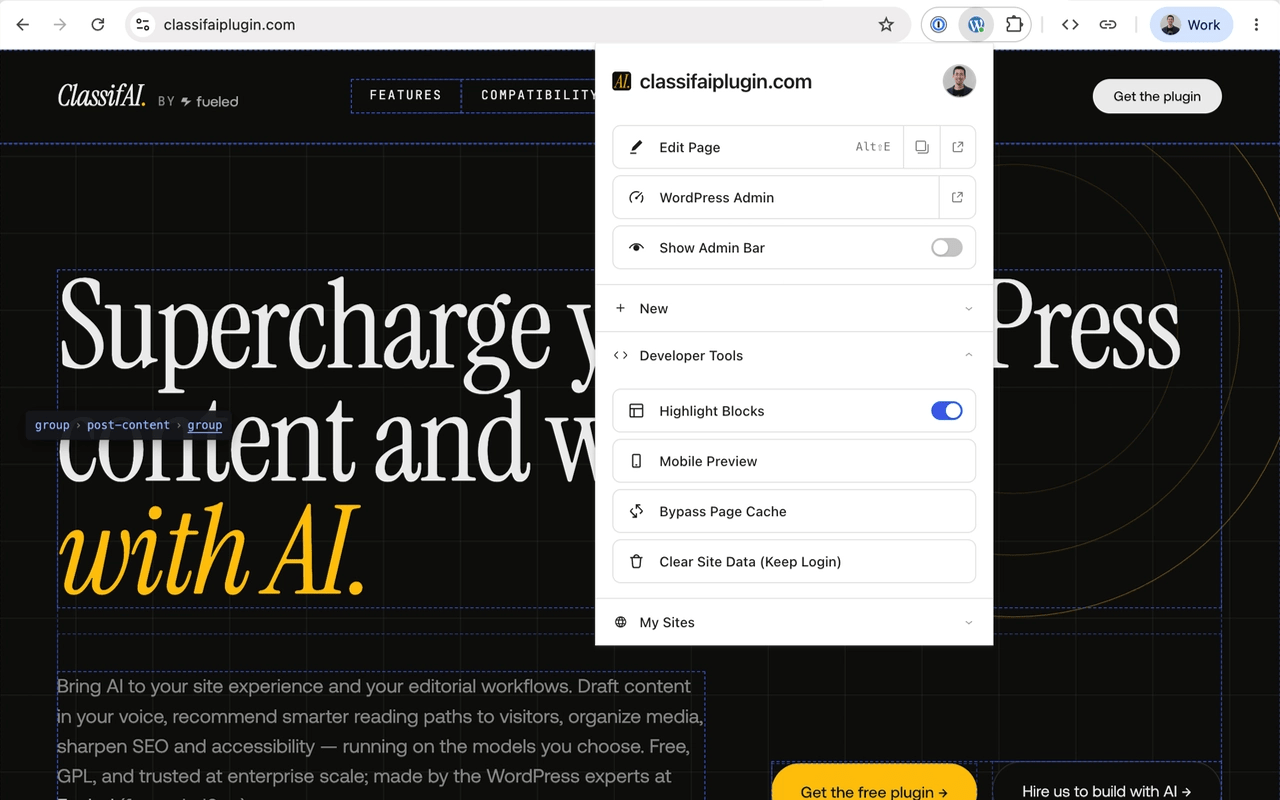
That opened the door to a collection of tools that make building, testing, and managing WordPress sites a little easier. Some are especially helpful for developers and QA teams, like the ability to outline blocks on the front end to better understand page layouts or instantly open a phone-sized preview with the surrounding browser interface stripped away.
There are also practical utilities for anyone working in WordPress. You can clear a site’s cookies and local storage without logging yourself out, which is useful when testing personalization, automation, or other behavior affected by locally stored data. The extension can identify when a site is running WordPress, often detect its version and hosting provider, and keep a list of the WordPress sites you’ve signed into so you can jump back into their dashboards with a click or two.
It started as a way to move the admin bar out of the viewport, but it has grown into a broader toolbox for people who spend a lot of time in WordPress. As we worked on it, we kept asking ourselves, “Is this something that’s easier to do from the browser than from inside WordPress?” In many cases, the answer was yes.
Annie: You’ve spent years building WordPress websites, plugins, and open source software, but you’d never built a browser extension before. What was the learning curve like?
Jake: The funny thing is that the underlying technologies weren’t really new to me. Browser extensions are still built with web technologies that I understand well, so concepts like accessibility, security, and good interface design all carried over.
The unfamiliar parts were the extension-specific mechanics: manifest formats, service-worker lifecycles, browser permission models, development tooling, and the different store processes. In the past, just learning all of that probably would have been its own project before I ever started solving the problem I actually cared about.
That’s what made this project so interesting. Instead of spending weeks getting oriented, I was able to focus on how I wanted the extension to behave and let modern tooling help bridge many of the implementation details.
Annie: You’ve also been very open about using AI tools like Claude Code and OpenAI Codex while building the extension. How did they change the development process?
Jake: This project wouldn’t exist, at least not today, were it not for these new AI tools. This was an AI-native, AI-first project. The strategy, technical architecture, approach, and quality oversight were driven by technical expertise and decades of deep knowledge between myself and other contributors who are better engineers than I am … and I was able to leverage the WordPress-specific instruction sets Fueled has invested in and uses with AI coding platforms to improve the output… but I’m entirely unashamed to say that I don’t think it has a single line of code typed out originally by humans. Even the documentation was drafted with AI, similarly guided and then refined by humans.
Asking how AI changed the development process is like asking how the tires changed the way I drove my car home. AI didn’t pick the destination or turn the steering wheel, but it was inseparable and foundational to the project.
Annie: Although the extension started as a personal side project, it quickly became a community effort. How did collaborators inside Fueled and across the WordPress community help shape version 1.0?
Jake: I never expected this to become an official WordPress project.
It started as a prototype that solved a problem for me, and I shared it with a few colleagues at Fueled who I suspected would appreciate the idea. Fabian Kägy [Principal Engineer – Editorial Engineering and a WordPress Core Committer] was one of the first people to see it. I was having too much fun working on it into the night. By the time I was about to sign off in California, he was coming online for his day in Germany. I threw it over to him for his thoughts and woke up the next morning to find he had already contributed major improvements to the architecture and introduced ideas that would help shape the extension, including some of its testing tools.
Shortly after, I showed it to Matt Mullenweg, WordPress founder and CEO of Automattic, curious if he had a perspective, and thinking he might get a kick out of it. He got excited about the idea and essentially asked, “What do you need to make this an official solution?”
Once the project became public as an official WordPress project, a handful of contributors from across the community began testing it and submitting improvements. Khokan Sardar from Travelopia became an especially active contributor, regularly testing releases, responding to issues, and contributing code.
WordPress project and Foundation leaders also helped with the less visible infrastructure around an official release, including developer accounts and store submission access.
Inside Fueled, a few folks from our Quality Assurance team played a notable role. They quickly found edge cases and issues in real-world workflows, helping make the extension much more polished.
That’s really what open source is about. One person’s idea becomes something much better because a community rallies around it.
Annie: You’ve spent much of your career contributing to WordPress outside of client work. Why do personal open source projects like this still matter?
Jake: Some of the best open source projects begin with someone scratching their own itch. Maybe virtually all of them, actually? Nobody hired me to build this, and I did not set out to create an official WordPress project. I had a problem I wanted to solve, and I had this amazing new generation of software development tools at my fingertips.
One of the most rewarding parts is watching an idea stop being uniquely yours. Someone improves the architecture, another person finds an edge case, and someone else contributes code. The project becomes stronger because people recognize the problem and want to help solve it. None of it is about exchanging money or tracking hours. It’s about making something better, and sharing that.
I have also been fortunate to work in environments that support that kind of contribution. Fueled has continued the culture we built at 10up: people share expertise and contribute to WordPress because a stronger platform benefits the entire ecosystem.
Annie: Now that the official WordPress Browser Extension is available, what’s next? Where do you see the project going from here?
Jake: The first priority is listening.
We’ve had a relatively small group of people using the extension during development, and now we’ll get to see how a much broader community uses it. Before we start adding a lot of new features, we want to make sure we’re responding to real feedback, fixing edge cases, and understanding what people actually find valuable.
That said, there are plenty of ideas we’re excited about. Expanding support for browsers like Firefox is high on the list, along with additional tools that can improve everyday WordPress workflows. One idea is browser-level editorial preferences that follow someone across every WordPress site they manage, such as automatically opening the block editor’s list view.
We are also interested in editorial tools that could help someone capture a page, link, or passage they encounter on the web and use it as the starting point for a new WordPress post, harkening back to old tools like the Press This bookmarklet for those who have been around as long as I have.
The extension started with one simple idea: moving the admin bar out of the way. Now that it’s an official WordPress project, I’m excited to see where the community takes it next.
Try the Official WordPress Browser Extension
The official WordPress Browser Extension is available now for Google Chrome and Chromium-based browsers and for Safari on macOS. Read the official WordPress.org announcement, explore the open source project on GitHub, or install it to bring essential WordPress shortcuts and tools into your browser.


Fueled helps organizations build and modernize enterprise WordPress platforms, integrate AI into digital products and workflows, and adopt AI-native approaches to design and engineering. Let’s talk.