
WordPress 6.9 and WordPress 7.0 added foundational AI infrastructure that makes it easier for developers, plugins, and product teams to bring AI into the CMS in practical, governed ways.
That foundation opens up new possibilities for applied AI in WordPress: editorial assistance, publishing workflows, provider flexibility, governance controls, and more specialized tools built around how teams already create, manage, and publish content.
Fueled has been helping bring AI into WordPress for years, first through ClassifAI, our enterprise-ready AI plugin originally created by 10up, now part of Fueled, in 2018, and now through our leadership in the official WordPress AI plugin, which recently reached version 1.0.
I sat down with Jeff Paul, VP of Open Source Initiatives, and Darin Kotter, Director of Open Source Initiatives, to talk about the state and future of both plugins, what Fueled has learned, and where applied AI in WordPress is headed.
Q&A with Fueled’s Open Source Leaders
Jake: Let’s start with the official WordPress AI plugin, or what used to be called the “AI Experiments” plugin. It is now, simply and remarkably, the AI plugin, renamed as part of its 1.0 release alongside WordPress 7.0. That feels like more than a version number. What changed, and why does this milestone matter?
Darin: I think there are two pieces to it.
The first is the foundation. The plugin has been built around AI Connectors, and with WordPress 7.0, that connector layer is now part of the current WordPress release. So the plugin is working with AI infrastructure that WordPress now ships with, rather than sitting on top of something more experimental.
The second is maturity. We have had time to build, test, improve the plugin, and respond to feedback. Reaching 1.0 is a way of saying the core pieces are in place, it works with the current WordPress release, and we feel good about treating it as the official reference plugin for practical AI features in WordPress.
There are also a couple of features in this release that are especially important for organizations thinking about AI governance.
The first is request logging. If it is enabled, site administrators can see AI-related requests happening on their site, whether those requests come from the AI plugin itself, WordPress core, another plugin, or a theme. They can see which tools are using AI, how often they are using it, how many tokens are being consumed, and which users are initiating those requests.
The second is connector approvals. If a site has an AI connector set up with a provider like OpenAI, Anthropic, or Google, connector approvals allow administrators to decide which plugins or themes are allowed to access those connectors. When the experiment is turned on, access is blocked by default, including for the AI plugin itself, and administrators explicitly approve what can connect.
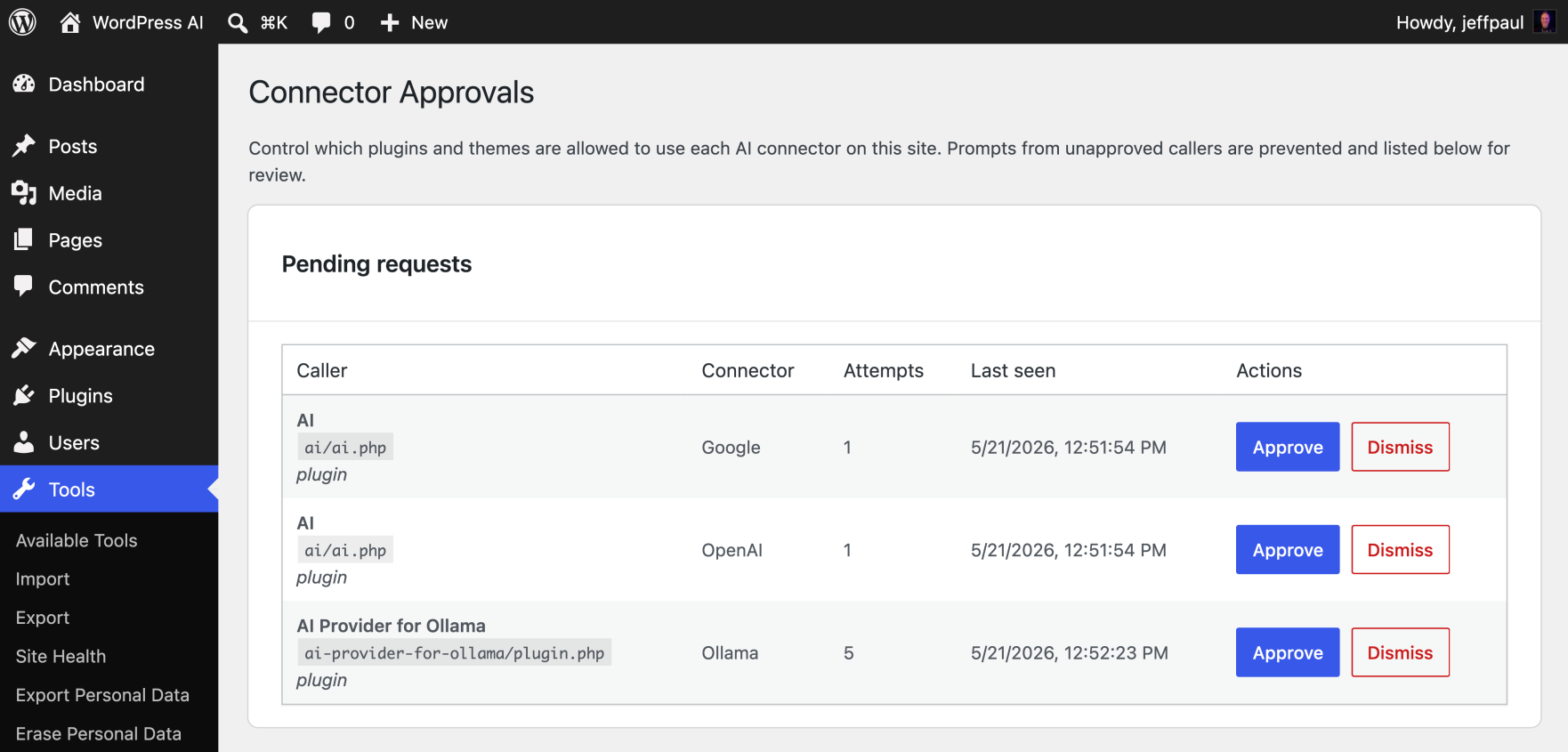
Together, those features give site owners much better visibility and control. That matters for any organization using AI in WordPress, but especially for larger teams where cost, security, and governance are part of the operational reality.
Jeff: Getting to 1.0 was also the result of a pretty sustained push. The plugin depended on foundational work in WordPress itself, including the Abilities API and the WordPress AI client. Once those pieces were available, Darin and I were shipping updates on a roughly two-week cadence, with support from contributors across the ecosystem and from design and product colleagues at Fueled.
One thing we focused on, based on what we learned from ClassifAI, was onboarding. For a lot of site owners, connecting an AI provider can be one of the biggest points of friction. We wanted the flow from learning about connectors to connecting a provider and trying the AI plugin to feel as straightforward as possible.
The experience will continue to improve, but it is much simpler than it could have been. AI in WordPress should be approachable for the people who manage sites and content every day, not reserved for developers or highly technical teams.
Jake: Fueled has played a central role in developing the plugin. What has that looked like in practice?
Darin: There are outside contributors, which is important to the nature of the WordPress project, but Jeff and I have led most of the development work on the AI plugin. A large share of the pull requests have come from us, and we review the pull requests that come from others. We have also been helping set the roadmap, respond to issues, and decide what gets merged.
Jeff: Through ClassifAI, we have spent years seeing what it actually takes for AI features to work inside editorial and publishing workflows. That gave us a strong point of view on where AI belongs in the WordPress experience, where friction tends to show up, and what organizations need before they trust these tools in production.
Jake: Some of the earlier AI plugin features were familiar ones: title generation, excerpts, alt text, image generation. What newer features feel more distinctive?
Darin: A lot of the early work was intentionally practical. Part of the goal of the plugin is to show how new AI building blocks in WordPress can be used. Title generation, excerpt generation, image generation, content classification, and similar features are common examples people understand.
Where it gets more interesting is when AI acts like another set of eyes in the editorial process, reviewing content in context and helping editors decide what needs attention. Editorial Notes is a good example.
WordPress recently introduced a Notes feature where someone reviewing content can leave comments at the block level. For example, an editor might leave a note on a paragraph asking for it to be rewritten, or on an image asking for alt text before publication.
The Editorial Notes feature in the AI plugin uses AI to review content block by block, looking for issues related to accessibility, grammar, SEO, and similar editorial concerns. It then leaves notes directly on the relevant blocks. A content creator or editor can review those notes and decide what to act on.
There is also a related feature called Editorial Updates. That allows AI to process pending notes and apply changes. Those notes might have been created by AI or by a human reviewer. The important thing is that the workflow stays inside WordPress. AI can help surface and apply suggestions, but editors still decide what changes make sense.
Jeff: That is the direction I find most interesting. The AI is working with WordPress concepts like blocks, notes, guidelines, and editorial review, so it starts to feel like part of the CMS instead of a generic text box that could be anywhere.
Another feature I am excited about is the integration with Site Guidelines in Gutenberg. The idea is that a site can define guidelines for tone, style, capitalization, image descriptions, or other editorial standards. The AI plugin can then use those guidelines when generating titles or other content, so the first draft is closer to how that site actually communicates.
Darin: Alt text is another good example. It sounds like an obvious AI feature at this point, but doing it well inside WordPress is more nuanced than just sending an image to a model and asking for a description.
Early on, we received good feedback from the community about how to make it better and more aligned with accessibility guidelines. A basic AI implementation might look at an image and describe what is in it. That can be useful, but it is not always what good alt text requires.
We improved the feature by giving the AI more context. Instead of only sending the image, we provide information about where the image appears, whether it is a featured image or an in-content image, and what content appears around it. We also use instructions that guide the AI through questions like: Is this image decorative? Is it linked? Does it need a description based on the surrounding content?
That still needs human review, but the first draft is better because the AI is responding to the page, not just the pixels in the image.
Jake: In WordPress, we talk a lot about open source, an open ecosystem, and user freedom. For people outside the community, that can sound a little abstract until you put it next to AI. Then it becomes very practical very quickly.
With AI, site owners want to know: What has access to my content? Where is my data going? Am I locked into one provider? Can I use a local or open source model? Can I turn things off if my organization is not ready?
That feels very connected to the way WordPress has always thought about ownership and control. How did that shape the way you approached AI in WordPress, especially heading into the 1.0 release?
Darin: That was very much the mindset going into 1.0. If AI is going to be part of WordPress, site owners need to be able to choose when and how it is used, configure it deliberately, and monitor what is happening over time.
Request logging and connector approval features in the AI plugin stand out here. Request logging gives administrators visibility into AI usage across the site: which tools are making requests, which users are initiating them, and how much is being used. Connector approvals give administrators a way to decide which plugins or themes can access a configured AI provider.
There is also control at the feature and provider level. A site owner might want title generation to use a locally hosted model, while image generation uses a different provider because it produces better results. That kind of flexibility is very consistent with WordPress.
For people who do not want to think about those details, the plugin can still be simple. They can turn on a feature and use it. For organizations that need more control, the architecture supports more deliberate choices about providers, features, and access.
Jeff: One thing that has been important to Darin, myself, and others at Fueled is making sure WordPress users are not locked into only the biggest or most expensive AI providers.
The default connectors are powerful, but they are not the right fit for every site. Some teams care about cost. Some care about licensing. Some want to use models that can run locally or on their own infrastructure. Fueled developed the AI Provider for Ollama plugin so site owners can use free and open-source models, including models that can run locally, in Ollama’s cloud, or on infrastructure an organization controls.
That is a very WordPress way to approach AI.
Jake: ClassifAI has been around since 2018. How did the experience of building AI in WordPress for nearly eight years influence the WordPress AI plugin?
Jeff: In AI terms, that is a long history. We were working on these problems when people were more likely to call it machine learning, and IBM Watson was one of the primary services teams were experimenting with.
Over the years, we have seen how organizations actually adopt AI in content workflows. Early on, the focus was often automation: set it up and let it do the thing. That has changed. Today, the better pattern is usually for AI to recommend something, then have a human editor review, refine, and apply it.
That thinking carried into the WordPress AI plugin. AI should be where people are already working: in the editor, in the media library, in the admin experience. People should not have to leave WordPress, open another tool, paste content somewhere else, and bring it back.
Darin: A lot of the early experiments in the AI plugin came directly from ideas we had already built in ClassifAI: title generation, excerpt generation, image generation, content classification. In some cases, we looked at how we had approached the UI or code in ClassifAI and used that as inspiration for the AI plugin.
Years of client work and community feedback also gave us a clearer sense of where AI can be helpful, where it can get in the way, and what controls people need. ClassifAI influenced the more philosophical direction too: provider agnosticism, pluggable functionality, granular feature controls, and the idea that AI should not tie a WordPress site to one model or vendor. And that influence was not limited to the AI plugin itself. Some of the broader conversations around the WordPress AI client and connector architecture also benefited from what we had learned through ClassifAI.
Jake: Around the same time the WordPress AI plugin reached 1.0, Fueled also shipped a major refresh of the ClassifAI site. That felt intentional to me. Even as more AI capability is moving into an official WordPress plugin, ClassifAI is clearly still important to us.
How are you thinking about ClassifAI’s role now? Where does it go from here?
Jeff: ClassifAI is absolutely still important to us. If anything, I think its role gets more distinct as the official WordPress AI plugin matures.
For years, ClassifAI had to do a little bit of everything because there was no shared AI layer in WordPress. It helped us explore the basics, like titles, excerpts, alt text, image generation, and classification. But it also helped us understand what larger teams actually need when AI becomes part of a real publishing workflow.
Now that WordPress has more of that shared foundation, ClassifAI can focus more clearly on the problems that tend to show up in enterprise environments: more control, more customization, deeper integrations, better reporting, and features that need to fit the way a specific site or team works.
Darin: The connector work helps with that too. ClassifAI can build on more of the shared WordPress AI infrastructure instead of maintaining everything separately. That lets us spend more time on the workflows and controls that make ClassifAI valuable for larger organizations.
It also gives us a cleaner path for the two projects to inform each other. ClassifAI influenced a lot of the early thinking in the WordPress AI plugin, and now some of the foundation created for the official plugin can make ClassifAI stronger.
Jake: So for teams looking at both, where is the line between the WordPress AI plugin and ClassifAI?
Jeff: The WordPress AI plugin is designed for a broad audience. Ideally, a site owner can enable a feature, pick a provider, and try something useful without a lot of setup.
ClassifAI is where we can take on the more complex work. Some features need deeper integration with a site’s theme, hosting environment, search infrastructure, or editorial workflow. Smart 404 pages are a good example, which we developed in partnership with Penske Media. To do that well, the feature often needs to connect to the theme and the way the site handles URLs and recommendations.
Other ClassifAI capabilities, including term cleanup, recommended content, and embedding-driven features, may require careful integration with search infrastructure, hosting, front-end templates, or a custom theme. That is where an agency like Fueled or an in-house technical team becomes important. The real value comes from integrating AI into a production environment in a way that performs well, respects the site’s architecture, and supports the organization’s workflow.
Darin: One of the biggest differences is control.
In ClassifAI, teams can modify prompts so the output better matches the organization’s tone, style, language, and expectations. For many enterprise content teams, that is essential. A generic prompt will rarely be enough for a brand with established editorial standards, compliance needs, or specialized subject matter.
ClassifAI also supports more granular user management. A team can make a feature available only to administrators, certain roles, or named users. That is useful for piloting AI with a small group before rolling it out more broadly, or for limiting higher-cost features to specific teams.
We also want to lean further into reporting and rate limiting. Larger organizations want to know which AI features are being used, which providers are being called, which users are using them, and how usage changes over time. From there, teams can make better decisions about access, cost, and governance.
Jake: I want to come back to the new ClassifAI site briefly, because I think the project itself says something about where WordPress and AI are headed.
I do not want to turn this into a separate case study, but I had the pleasure of being part of that rapid microsite refresh, and it was a very hands-on example of how much more our team can do with AI in and around WordPress now. We used WordPress 7.0, Claude Design and Code, and Fueled’s internal AI delivery systems to move quickly from design to build to content.
It also inspired me to build my first new plugin in years: Auto Release Posts for GitHub. It uses the new WordPress AI Connectors, the same foundation the AI plugin builds on, to help turn GitHub release activity into draft WordPress posts.
That felt like a useful example of AI supporting a real publishing workflow inside WordPress. Is that the kind of applied pattern you expect to see more of?
Jeff: Yes, and I think that is a good example because it is specific. A lot of the most useful AI features in WordPress are going to be focused workflows that remove friction from something a team already does.
Release posts are a great example. The source material already exists in GitHub, but turning that into a useful post still takes time and editorial judgment. AI can help prepare the first draft, and the person publishing it can still shape the final result.
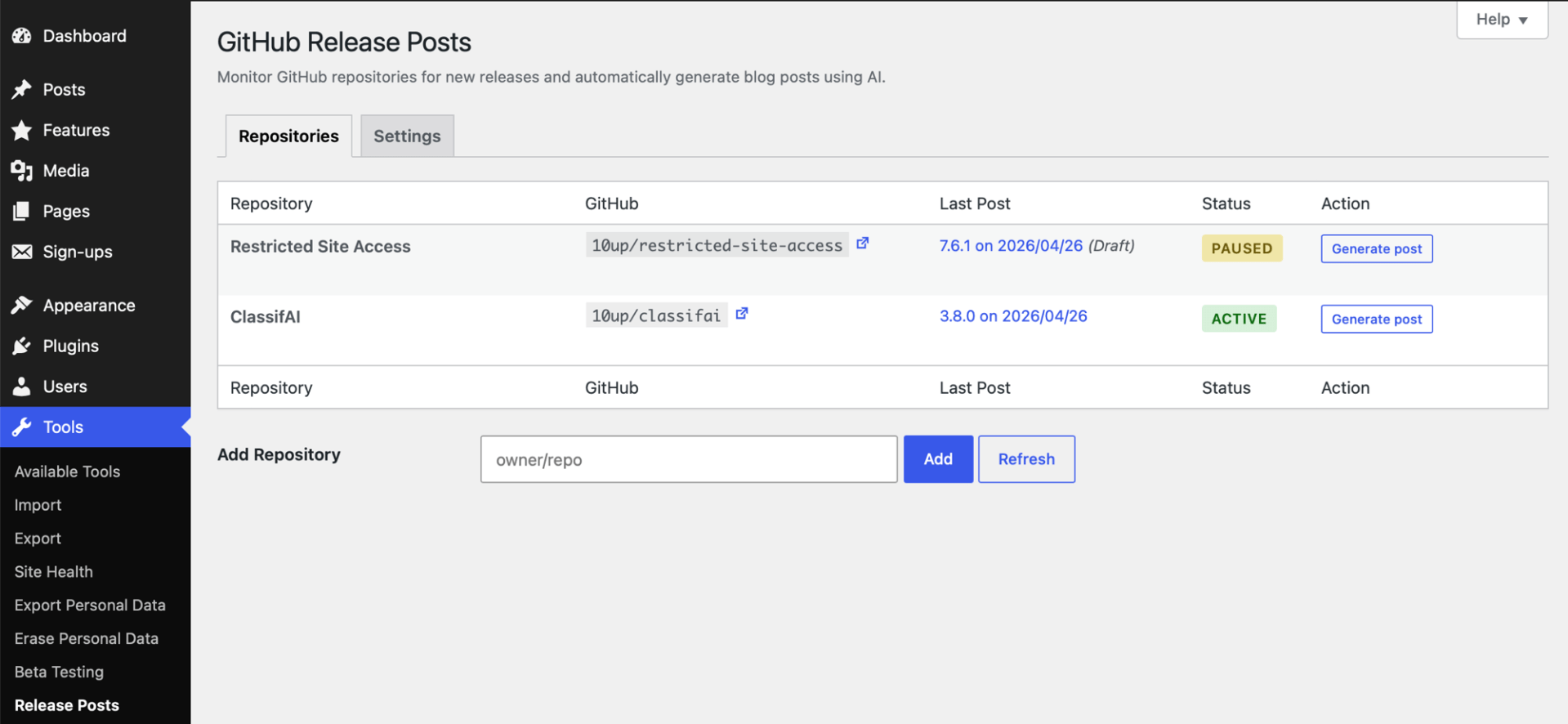
Darin: The AI Connectors make that kind of thing much easier to build in a repeatable way. A plugin does not have to be hard-coded to one provider or one model. It can use the connector layer and let the site owner decide what provider makes sense.
That is part of what the official AI plugin helped prove out. It shows how these pieces can work together, and then other plugins can use the same foundation for more specific workflows.
Jake: Looking ahead, what kinds of AI capabilities are you most excited about next?
Jeff: I keep coming back to the idea of AI helping people manage and assemble WordPress experiences, not just generate copy.
Today, if someone wants to build a new page, they might go into the site editor, search for patterns, assemble blocks, adjust content, preview, and keep iterating. There is a real opportunity for AI to make that more conversational. A site manager could describe the page they need, have WordPress assemble a strong draft from the site’s existing patterns and guidelines, then review, refine, and publish.
I am also interested in smaller moments inside content workflows. Type-ahead suggestions in the block editor are one example. Analytics-aware workflows are another. If search or analytics data is available, AI could help identify topics visitors are looking for, recommend related content, or point to an evergreen post that may be worth updating or promoting.
Trust is part of this too. We are looking at content authenticity through the Content Authenticity Initiative and C2PA tooling, with the goal of giving organizations better provenance and auditability when AI is used to create or modify content and images.
The strongest features should fit the workflow so closely that people experience them as WordPress helping at the right moment.
Darin: For me, it is agentic workflows, but with a lot of caution around safety and usefulness.
Most AI features today are pretty direct. Click a button, send a request, get a response, decide what to do with it. Agentic workflows open up something different. AI can look at the available tools in WordPress and decide what step should happen next.
That can be powerful, but it raises real questions. How do we make sure AI does not access private or sensitive content? How do we prevent runaway token usage? How do we make sure it is solving a real problem and not just doing something that looks impressive in a demo?
That is the thing I keep coming back to with both ClassifAI and the AI plugin. The goal is to solve real workflow problems for people managing WordPress sites, with enough control and oversight that teams can actually trust the workflow.
Jake: Is there anyone else you’d like to thank or shout out for helping bring these efforts to this point, beyond the wider WordPress project leadership?
Jeff: There are also people across Fueled who contributed from design, product, and engineering, including Lina Wiezkowiak, Rachael Cortellessa, Lauren Woodmansee, and Ty Bailey. And there are community contributors, including David Nache and others from Automattic and the wider WordPress ecosystem.
That is one of the strengths of this work. It is happening through a mix of agency experience, open source contribution, product thinking, and community collaboration.
Turning WordPress AI Infrastructure Into Real Workflows
ClassifAI has been proving for years that AI can meaningfully support WordPress content and publishing workflows.
Recent WordPress releases and the official WordPress AI plugin are making the foundation more shared, standardized, and easier to build on.
Fueled is helping shape that foundation through our contributions to WordPress and the official WordPress AI plugin. We are also bringing that expertise to ClassifAI and other open source tools built for more advanced, enterprise-grade applications inside WordPress.
If your team is exploring how AI can support WordPress content operations, editorial workflows, product experiences, or platform strategy, reach out.